
Though tech giants hope to usher in a passwordless future in the form of passkeys, we’re nowhere near there yet, and strong passwords are something you’ll need until that future arrives.

If you have an iPhone in your pocket, then you may rely on iCloud Keychain’s password generator to conveniently create and store your passwords. For the most part, it works great, but it’s limited in terms of how and when you can create a password, leaving you to create one on your own at times. This can easily be achieved by using a password generator in your web browser, but there’s a simpler way to do this with a straightforward Shortcut.
With the Generate Password Shortcut, you’ll always have a go-to destination for creating secure passwords, without the limitations you run into with iCloud Keychain. It’s free to download, and we’re going to show you all the ways you can use it, below.
For more tech tips, check out how to improve the reception of your iPhone or Android phone and the iPhone gesture you need to know.

Two-factor authentication adds another layer of security to your accounts, by asking you to verify your identity via text or app. However, the most secure 2FA option is with a physical key, like this one from Yubico, which you insert into your iPhone’s charging port. A hacker would need both your password and this key to access your accounts protected by 2FA.
Details
Download the Generate Password shortcut
Using the link below, download the Generate Password shortcut onto your iPhone. This will automatically redirect you to the Shortcuts app — tap Add Shortcut to download the shortcut on to your phone. The Generate Password shortcut will then appear in your library of shortcuts.
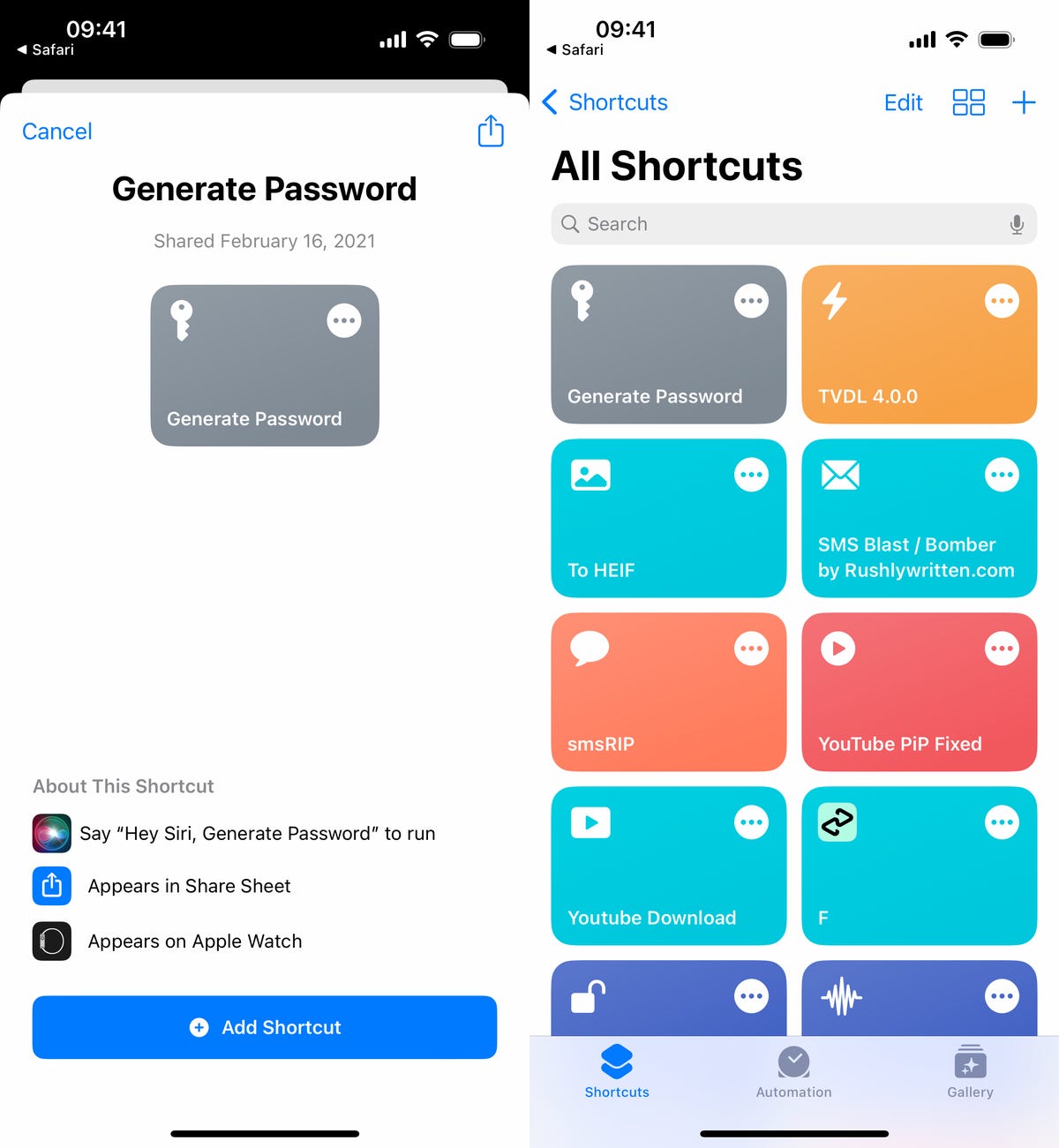
Generate Password will be saved to the Shortcuts section in the Shortcuts app.
Your on-demand iPhone password generator in action
Once the shortcut is installed, you can use Generate Password to quickly create Apple-style passwords, which are 20 characters long and include two hyphens, a capitalized letter and a number (“fevNaq-1zumki-gorfoc” is an example).
There are several ways to use Generate Password:
- Siri: Say, “Hey Siri, Generate Password.”
- Share Sheet: Tap the share sheet in Safari or anywhere else, scroll down and tap Generate Password.
- Shortcuts: Tap the Generate Password shortcut directly in the Shortcuts app.
- Back Tap: Go to Settings > Accessibility > Touch > Back Tap and choose the Generate Password shortcut. You can then tap the back of your iPhone to run the shortcut.
The first time you run Generate Password, you’ll be asked to give the shortcut access to your clipboard. Hit Allow to do so. From then on, anytime you run Generate Password, a password will be created and automatically copied to your clipboard. You’ll also see a notification showing you the password. Hit Done when you’re finished.
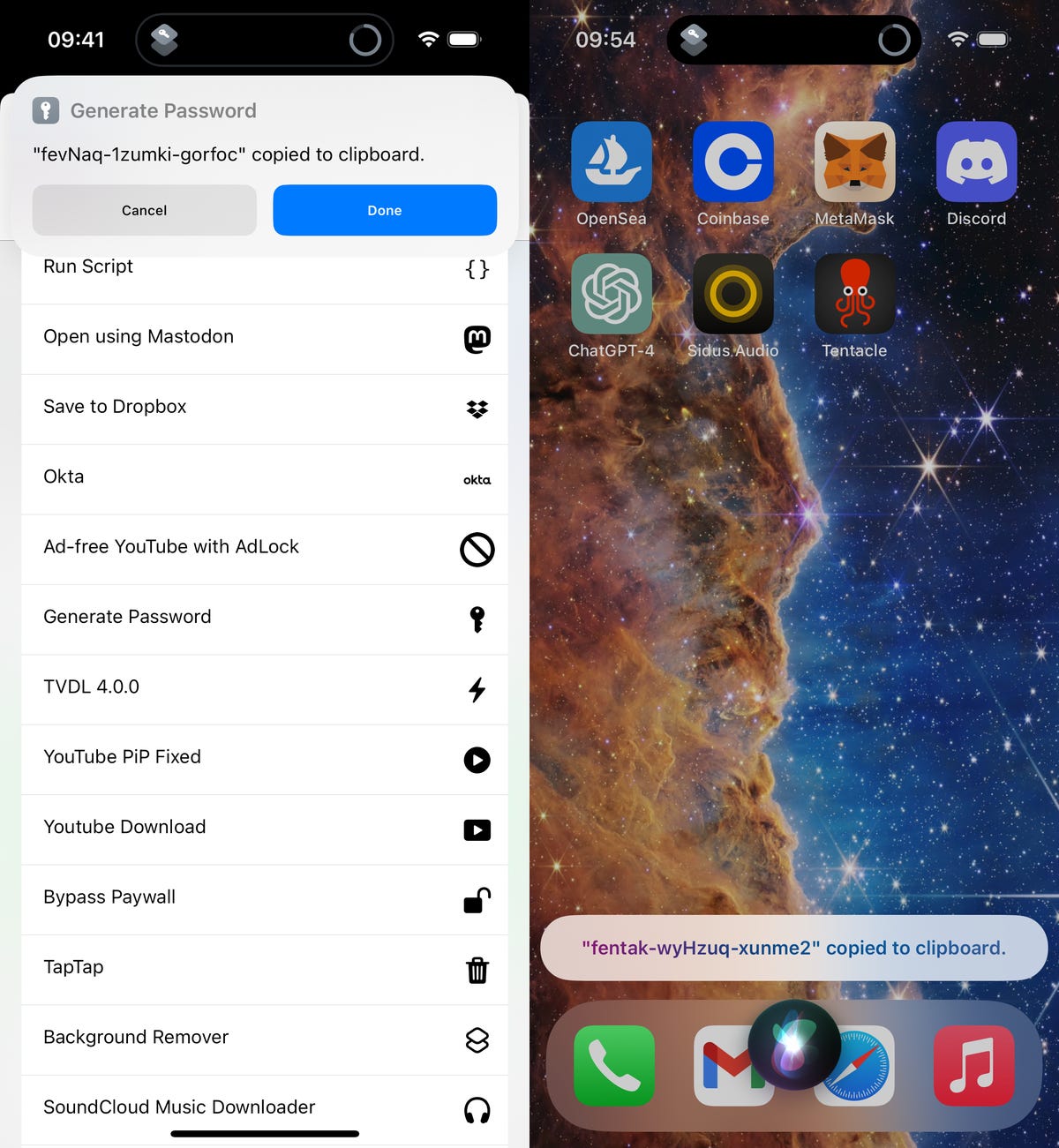
Generating a password via Share Sheet (left) and Siri (right).
The password will expire from your clipboard in 10 minutes, so make sure to use it relatively quickly, or else you’ll need to generate a new password. You can press down in any text field and hit Paste to enter the password from your clipboard.
Need more tech tips? Don’t miss two must-try iPhone battery hacks and the hidden iOS feature to make your iPhone’s calls sound better.

Khamrah by Lattafa for Men - 3.4 oz EDP Spray
4% Off
Ghost Sweetheart Eau de Toilette | Pineapple, Jasmine and Sandalwood | Perfume for Women 50 ml
50% Off
Marc Jacobs Dot Eau De Parfum for Women, 100 ml
42% Off
Ted Baker W Eau de Toilette for Her, Fig Leaf, White Peony and Violet Top Notes, Pink Orchid and Raspberry Middle Notes, 75ml
£11.77 (£15.69 / 100 ml) (as of 04/11/2026 05:40 GMT +00:00 - More infoProduct prices and availability are accurate as of the date/time indicated and are subject to change. Any price and availability information displayed on [relevant Amazon Site(s), as applicable] at the time of purchase will apply to the purchase of this product.)
Ted Baker Woman Pink Eau de Toilette Spray Floral Green Feminine Fragrance, Opening Notes are Fresh Peach, Bergamot and Tangerine with Warm Musk, Vanilla and Vetiver Base, 100ml
11% Off
Vera Wang Princess Eau de Toilette - 30 ml
Choco Musk 50ml Eau De Parfum for men and women | Chocolate Musk by Jannat Aromas
17% Off
Christina Aguilera Signature Eau de Parfum (50ml) Floral, Fruity & Exotic Scent, Luxury Fragrance for Women
9% Off
Calvin Klein - Eau De Toilette CKIN2U - Calvin Klein Women, Ladies Perfume, Women's Perfume, Calvin Klein Perfume, Calvin Klein One - 150 ml
5% Off
Jimmy Choo Flash Eau de Parfum, 60 ml (Pack of 1)
3% Off
Fruit of the Loom Men's Heavy T Shirt, White, XL UK
28% Off
ATNKE LED Lighted Beanie Cap,USB Rechargeable Running Hat Ultra Bright 4 LED Waterproof Light Winter Warm Gifts for Men and Women/Pink
17% Off
Men's 1/4 Zip Pullover UK Sale Clearance, Fleece Sweatshirt Casual Jumper Long Sleeve T-shirt Top Stand Collar Sweater Plain Pullover Sports Leisure Workwear Quarter Zip Sweater Lightweight Jumpers
£5.88 (as of 11/11/2025 23:52 GMT +00:00 - More infoProduct prices and availability are accurate as of the date/time indicated and are subject to change. Any price and availability information displayed on [relevant Amazon Site(s), as applicable] at the time of purchase will apply to the purchase of this product.)
Crevice Cleaning Brush, Bathroom Tile Groove Gap Cleaning Brush,Premium Crevice Cleaning Tool Aluminum Support with 15° Angle Magic Brush, Thin Brush for Home Kitchen
19% Off
Wireless Earbuds, Bluetooth 5.3 Headphones in Ear with HiFi Stereo Deep Bass, 4 ENC Noise Cancelling Mic Wireless Earphones 40H Playtime, Bluetooth Earbuds Dual LED Display, IP7 Waterproof, USB-C
42% Off